Quite often we end up in need of backing up our smartphone data to our local computer. That is when PC Suite or desktop phone manager comes in handy. Nowadays, we also have cloud storage to backup some of our data but then, cloud storage comes with limited storage if free and of course, it required data connection to upload (better do it on WiFi). And generally, not all photos and videos we took from our phones are not worth uploading all to cloud storage. That would be a waste of our precious space. So the ultimate choice is to store it on our computer or on external hard disks. That's when PC suite and phone manager comes in handy. We can also copy or transfer files from phone to computer and vice-versa just by using USB cable but having a PC Suite helps us in doing more with our phone than just transfer files. In this post, we shall see top five FREE PC Suite or phone manager software for Android smartphones.
Some phone manufacturers provide their own PC suite. We may fondly remember Nokia PC Suite as well from those days. Others include Samsung's Kies, Mi Phone's Mi PC Suite etc. But if your phone manufacturer did not provide a PC suite software or if the pc suite software is not working as expected, you can try any of the below free desktop Android phone managers to manage your Android phone from a computer.
Hi Suite
HiSuite is a PC suite software by Huawei. This pc suite works well for managing Android phone. The software has an easy to navigate and clean interface. HiSuite is available for free.
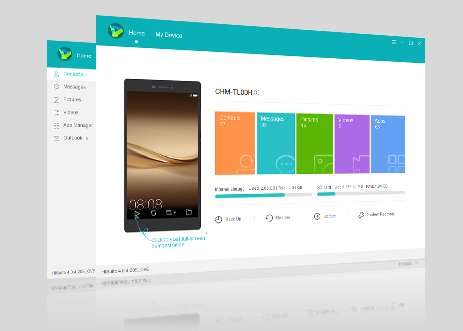
Source: http://consumer.huawei.com/minisite/HiSuite_en/
Features of HiSuite:
App Management
View, install, uninstall and update your Android phone apps right from the computer
Contacts Management
Add, delete, edit, export, import and manage contacts from your computer
Messages
Send, receive, manage and export right from your computer
Images and Videos
View, Manage, Import, Export photos and videos from phone to computer or vice-versa.
Phone software update
Update phone system updates conveniently from your computer
Screenshot
Take screenshot of your Android Phone screen from your computer
Data backup and restoration
Back up important data on your phone, such as your contacts, messages, apps, pictures, videos, songs, call logs, emails, and agendas, to a computer.
Restore your backup data with ease
Note: Backup and Restore will work only for Huawei Phones.
Download HiSuite - Android Smart Device Manager
Moborobo
Moborobo is another free Android phone manager tool to manage your Android device from the comfort of your desktop computer to manage all of the content on your Android device, make backup copies of content on the phone. You can install, uninstall and update Android Apps directly from the program's interface. Just like most desktop phone managers, it can manage music, photos, videos, ringtones, wallpapers, and other multimedia on the phone right from computer.
Moborobo pc suite software also projects the current display of the Android device connected on the software. Controls are available with which you can easily take screenshots of the display if required. The user interface is clean and easy to navigate.
The software also includes a file and app manager, and with it you can manage everything right from the desktop. You can also create a complete backup of your device and restore. The also also supports Wi-Fi connectivity in case you find USB cable connections annoying.
Download Moborobo
Mobogenie
Mobogenie is another desktop Android phone manager that is worth mentioning. Like any other desktop phone manager, it allows managing of contacts, messages, apps and file explorer. You can also create backup of the device and restore.
Mobogenie also offers one-click root access for supported devices and with it you can uninstall stock apps, save battery usage and generally do whatever you want.
Download Mobogenie
Droid Explorer
Droid
Explorer is a full Android PC Suite along with the familiar Windows Explorer UI experience. Along with all simple tasks like SMS Backup, Phone Backup, Contacts Optimization, Photo & Videos Management, this software also lets you fully exploit your Android Device.
Download Droid Explorer
While in the context of Android phone management from computer, the free software discussed are quite sufficient but in case if there are certain features that you want and are not available, you might also explore other paid versions listed below. But personally, I feel that the free ones also has sufficient features for management of Android phones from computers.
Other paid Android Smartphone managers. Click on the links to know more.
1) AirDroid
2) MyPhoneExplorer
3) Wondershare MobileGo for Android