Showing posts with label slider. Show all posts

Recycle Bin


A new feature called Recycle Bin has been added to Oracle Database 10g. When a database object is dropped, it is stored in the recycle bin. If a table is dropped, the dependent objects in the table (such as index, constraints) are also stored in the recycle bin. The name of the object stored in the recycle bin is changed, the bin $$ prefix is ​​attached at the beginning of the name of the object. If a user accidentally drops a table or database object, it can be retrieved from the Recycle Bin; As a result, database recovery is not required. Recycle Bin Enable / Disable By default Recycle Bin is enabled. The command to view the current status of the recycle bin is given, or if the recycle bin is disabled, the following command must be given to enable it. Enable Recycle Bin for Specific Sessions Enable Recycle Bin of the Database The following command must be provided to disable the Recycle Bin for specific sessions. Disable the Recycle Bin for a specific session Disable the Recycle Bin of the database Displaying the contents of the Recycle Bin If any object is dropped, it is stored in the Recycle Bin. If you want to see the objects stored in the recycle bin, you have to query the recycle bin. To recycle bin query you need to enter the following command SELECT * FROM RECYCLEBIN; Or, SELECT * FROM USER_RECYCLEBIN; Or SELECT * FROM DBA_RECYCLEBIN; to view the information in the dropped table, the following command can be given to restore the object in the bicycle bin. For example, the object in the Recycle Bin has to be PURGE to permanently delete the object in the Recycle Bin. Once the object is PURGE it is no longer possible to get it back. Shows how to PURGE an object

PUBG Mobile to make a comeback in India, pumps $100mn into gaming

 PUBG Corporation on Thursday announced that it is planning to launch PUBG Mobile game in the Indian market, months after being banned by the government due to national security concerns.


 PUBG Mobile to make a comeback in India, pumps $100mn into gaming

The immensely popular PlayerUnknown’s Battlegrounds (PUBG) Mobile app was among the 118 Chinese apps that the Indian government banned in September over security concerns. At that time, the mobile game was crowned with India’s top downloaded title having around 50 million users, reports suggest.

With its South Korean parent company Krafton, Inc., PUBG Corp also plans to make investments worth $100 million in India to cultivate the local video game, esports, entertainment, and IT industries, the company said.

To get the ban lifted, the South Korean developer has made the decision to no longer authorise the PUBG Mobile franchise to China-based Tencent Games in India. Confirming this on Thursday, PUBG Corp said it is preparing a new game— PUBG Mobile India, created specifically for the Indian market.

The Indian subsidiary will hire over 100 employees specialising in business, esports, and game development, PUBG Corp said. In addition to establishing a local office, the company will look to actively collaborate and leverage local businesses to strengthen its gaming service, it added.

The company also revealed plans to provide a secure and healthy gameplay environment alongside investments to cultivate local video game, esports, entertainment, and IT industries.

To assuage privacy and data security concerns, PUBG said it will conduct regular audits and verifications on the storage systems holding Indian users’ personally identifiable information to reinforce security and ensure that their data is safely managed. To build and foster a healthy gameplay environment, in-game content will be improved and tailored to reflect local needs, it added.

Various aspects of the game will be customized for Indian gamers, such as the game now being set in a virtual simulation training ground, new characters automatically starting clothed, and green hit effects to reflect the virtual nature of the game.

The PUBG Corporation, however, did not disclose the launch date of the game.

Unblock Website URL on Facebook - 200% Working Guaranteed

Unblock your Website URL on Facebook - 200% Working Guaranteed ✌✌. Today I am going to share 200% Working Trick with all. if you have already tried the previous Trick I have shared here.
Then tried today trick that has shared below in this post. I assured you that you will get unblock your website URL because I have used this trick to unblock mine website on facebook


Friends, I can understand, how it is painful when you can't get traffic from Facebook for your website article. I have written this 👉 How to post a blocked URL or unblock your website on Facebook! 👈article to help you to unblock your website URL on Facebook. If you follow all above given steps and And it's been more than 10 days now. Still, your website is not approved as an unblocked website.

I have a great Trick for you It will work for 200%. Because I have tried this trick for my website - https://www.bongopratidin.com.

Follow 3 Steps given below for unblock website URL on Facebook. ✌👆👈

Friends, you have to convenience Facebook Team that your website doesn't have only safe content for its users. You never spam on Facebook. Here are the steps of this trick. Hope you get solution.

Step 1 👉 Get share of your article.
Ask 3 and 4 friends to share any one article of your website to their Facebook timeline.
If anyone shares your article.
They will get a popup like its spam or get nothing.
but after a few minutes ask them to check their notification.
Notification will be like this 👇 See the picture below.

Unblock website URL on Facebook - Notification


Step 2 👉- Click on Notification in notification bar.
Now tell Friends to click on notification like in above given image.
After clicking this notification you will be diverted to a new page.
You got this message "This post goes against our Community Standards on spam".  See the image given below. 
Don't worry about it and just follow the steps as I have conveyed. 

Unblock website URL on Facebook by Request review
Step 3 👉-Click on "Request Review" Button.
Now Ask your Friends to "Request Review" like above-given image. 
Just click on the Request Review button for Review the shared blocked URL. 
After "Request Review" you have to wait about 24 hours to 1 week. 
If takes a long time don't panic. Just have patience and wait for Facebook reply.
Unblock URL on Facebook - under review

Random Questions are being asked on Facebook regard website URL blocked.:

1. How to unblock Domain Link / website URL on Facebook?
Ans.: with the help of these trick you can unblock your Domain URL.

2. Unblock Website URL from Facebook?
Ans.: Use Second Trick if First trick doesn't give the result.

3. My Website URL blocked By Facebook | How To Unblock?
4. how to get unblock your website on Facebook?
5. How to unblock a website on Facebook?
6. How unblock my website on Facebook?
7. Facebook blocked my website?
8. How to post blocked website post or content?
9. how to unblock website from Facebook?
10. how to unblock website from Facebook?
Ans.: For get the solution of above given question, You will have to try above mention tricks. I assured you that you will definitely get a solution after use of these tricks

My words:with the use of above-given steps you will get unblocked your website on Facebook. hope you will not appreciate my work and give your feed in the comment box.

How to unblock Domain / Website URL on Facebook! (100% Working) | Bangla Tech Jagat


How to unblock your website on Facebook? 

How to post a blocked URL or unblock your website on Facebook! (100% Working): Facebook is the social platform that has higher no of the user with high responsibilities. It is becoming an ecosystem so that Facebook improve its policies for its user security. Now a day's most of the people invest 30%-50% of the time on social media. Due to lots of users, Facebook gets aware of the misuse of its services that are free for everyone on this globe.
Here is solution to unblock your website URL on Facebook. Unblock your Domain from Facebook by follow the steps.

Lets understand, Why website have blocked. 

Now we discuss, why a website URL blocked on Facebook. or Why user have been prohibited to share its website links on Facebook page timeline. These questions come with the answer. A website like Facebook comes with lots of functionality that takes action automatically. This is called Artificial Intelligence.

Reason Behind Website Being Blocked.

We all know that Facebook and many other website has changed there policies. After these Policies changes, the unsafe website has started to be blocked. Facebook has taken this step to strengthen its user security.  In this process, some safe website URL has also blocked. The reason behind this would be the wrong reporting. I mean, This would have happened because a stranger reported your website on Facebook as spam. This is my guess. But There have no one who blocks your website URL manually or prohibited you by sharing your website URL. It's a machine program that gets instruction provided by you and design by Facebook developers team. If you try to act smart and share your website URL in a comment or others timeline or other pages or own pages continuously its being recognize as spam or misleading content.

Find the place where you get all solution related to Facebook. it is Facebook Help Center

Steps to unblock website URL on Facebook.

  1. Go to the Facebook Help Center to find.
  2. Visit the Facebook Sharing Debugger page.
  3. Enter your website URL in sharing debugger fill box and press debug button.
  4. Now you get the message "We can't review this website because the content doesn't meet our Community Standards. If you think this is a mistake, please let us know."
    facebook sharing debugger - unblock website url on facebook
  5. Now Click on "let us know" on this page. 
  6. Now you are at Facebook Block Page. Here you can request Facebook to unblock your website.
    Facebook Blocks Page - unblock website url on facebook
  7. Now write an application to unblock your website URL. 
  8. Submit it by click on the Send button.
  9. Now, wait until 24 hours as this request telly by Facebook team. and hope for a positive result. 
 you can find below an application format for unblocking your website on Facebook.

Application Format to unblocks website URL on Facebook. 

Good Morning Facebook!
With due respect, I would like to inform you my website URL have been blocked on Facebook. Recently I got know my website URL: https://www.yourwebsitenamehere.com has blocked on Facebook and prohibited me to share my website links over my pages and my timeline.
I didn't go against your policies. I apologize If I have broken any Facebook policy by any mistake.
It is requested please unblock my website URL and enable its links. I thank Facebook Team for making it a safe place for all.!
Please Unblock my website.
URL:  https://www.yourwebsitenamehere.com
Thanks in Advanced.
Manish Kumar

Questions are being asked on Facebook regard website URL blocked.

  • My Website URL blocked By Facebook | How To Unblock?
  • how to get unblock your website on Facebook?
  • How to unblock a website on Facebook?
  • How unblock my website on Facebook?
  • Facebook blocked my website?
If you have already tried the above-given Trick. Then tried this trick that has shared below in this post. 👇

My Words: Hello guys, I hope this article will help you and you will again get access to sharing your website links on Facebook. If you have still any query then let me know by a comment on this post.

What is a domain name? | Bangla Tech Jagat


A domain name is your website name. A domain name is the address where Internet users can access your website. A domain name is used for finding and identifying computers on the Internet. Computers use IP addresses, which are a series of number. However, it is difficult for humans to remember strings of numbers. Because of this, domain names were developed and used to identify entities on the Internet rather than using IP addresses.


A domain name can be any combination of letters and numbers, and it can be used in combination of the various domain name extensions, such as .com, .net and more.

The domain name must be registered before you can use it. Every domain name is unique. No two websites can have the same domain name. If someone types in www.yourdomain.com, it will go to your website and no one else's.

The price of a domain name typically runs between $15-25 per year.

With Website.com, a professional domain name is included for free with all premium site builder plans. With our current promo, you can own a custom domain name and create your entire website at only $2/month for the first year.

Professional emails at your domain name can also help you boost your credibility and build your brand. Email accounts are included with Website.com Business plans and above, starting at the promo price of just $5/month for the first year.

Why you need a Domain Name

On the Internet, your domain name is your unique identity. Any individual, business or organization planning to have an Internet presence should invest in a domain name. Having your own domain name, website and email addresses will give you and your business a more professional look. Another reason for a business to register a domain name is to protect copyrights and trademarks, build creditability, increase brand awareness, and search engine positioning.

With Website.com's premium plans, as a domain name is one of the most crucial tools to build your reputation, we include your custom domain name in your plan for free.


Free Domain Names


Free Domain Names are sometimes available from certain providers, and are usually in the form of [yourname.webhost.com]. A domain name in this format is also known as a subdomain.

Although a subdomain is free and functional on the Internet, it has its limitations:

  • Your professional image will not be as strong as having a custom domain name.
  • It is not easy for your visitors to find your website, as now they need to remember your website name as well as your host's URL.
  • You will not be able to transfer the subdomain to another web host.
Free site builder plans with Website.com provide you with a free subdomain so you can start building your online presence right away! However, when you are ready to take your online presence to the next step, you will need a professional domain name.

The good news? All Website.com premium plans include professional domain names in your plan - for free.


How to Setup Fingerprint Lock on WhatsApp | Bangla Tech Jagat


  1. You can now add a fingerprint lock to WhatsApp on Android
  2. You can unlock the app with your fingerprint
  3. No need to use third-party apps to add this any more

Over the past few months, WhatsApp has rolled out a bunch of new updates for both Android and iOS. One of these new updates lets you add a fingerprint lock to WhatsApp. This means that you can't access WhatsApp chats without unlocking the app via a fingerprint saved on the phone. Of course, you need a smartphone with a fingerprint sensor for this to work and the latest version of WhatsApp. Fingerprint lock on WhatsApp for Android works with phones that have a capacitive fingerprint sensor, and those that have an in-display fingerprint sensor. In this article, we will describe how to add a fingerprint lock to WhatsApp on Android.
Now, this feature has been available on WhatsApp for iPhone since February this year, and it first appeared in a beta build for WhatsApp's Android users back in August.
Here's how to set up WhatsApp fingerprint lock on your Android smartphone.
How to set up fingerprint lock on WhatsApp for Android
Before proceeding, make sure you have installed WhatsApp version 2.19.221 or above by heading over to the WhatsApp page on Google Play. Once that is done, simply follow these steps to secure your WhatsApp chats on Android with fingerprint authentication.
1. Open WhatsApp > tap the vertical three dots icon on the top-right and go to Settings.
2. Go to Account > Privacy > Fingerprint Lock.
3. On the next screen, turn on Unlock with Fingerprint.
4. Additionally, you can also set the duration after which you'll have to use your fingerprint to unlock WhatsApp. It can be set to Immediately, After a minute or After 30 minutes.
5. Further, you can also choose if you want to show the message content and sender in the notifications or not.
Now whenever you open WhatsApp, depending on the automatic lock duration you've set, you will need to apply your fingerprint to unlock the app. And that's how you can set WhatsApp fingerprint lock on your Android smartphone.

REDMI NOTE 8T launches, quad camera phone and know what's new! | Bangla Tech Jagat


Xiaomi has launched their Redmi Note 8T smartphone in Europe.  Redmi Note 8T Phone Price 179 Euros (approx. 14,065) This phone has 3GB RAM and 32GB storage.  A 4GB RAM 64GB variant has been launched with the phone priced at 199 Euros (around Rs 15,670) and the 4GB RAM and 128GB storage variants of this phone are priced at 249 Euros (approx. 19,565).

 Advertisements


 The Redmi Note 8T phone comes with the MoonShadow Gray, StarScape Blue and Moonlight options and will be sold in Spain on November 8 and in France on November 13, with the phone being sold in Germany on November 15.  And the device will soon arrive in the UK, the Netherlands, Belgium and elsewhere.

Redmi Note 8T has a 6.3-inch Full HD + display and its resolution is 1080 x 2340 pixels.  And this phone has sunlight mode, night mode and reading mode.  And on this phone you will get Qualcomm Snapdragon 665 AIE SoC.  And on this phone is the Adreno 610 GPU and on the phone you get 4GB LPDDR4X RAM.  The phone has 128GB of storage which can be expanded up to 256GB via microSD card.

 If we look at this phone's camera, you will find a quad camera setup on this phone which offers 8MP camera with 48MP main camera and two 2MP camera.  And this phone has a 13MP front camera.

 Advertisements


 Redmi Note 8T is based on Android 9 Pie and has 4000mAH battery on MIUI 10 and phone which supports 18W quick charge.  And on this phone you will find 4G LTE, Wi-Fi 802.11ac, Bluetooth, v5.0, GPS / A-GPS, NFC, USB Type C and 3.5mm headphone jack.

This 10000mAh battery power bank came to India in great colors | Bangla Tech Jagat


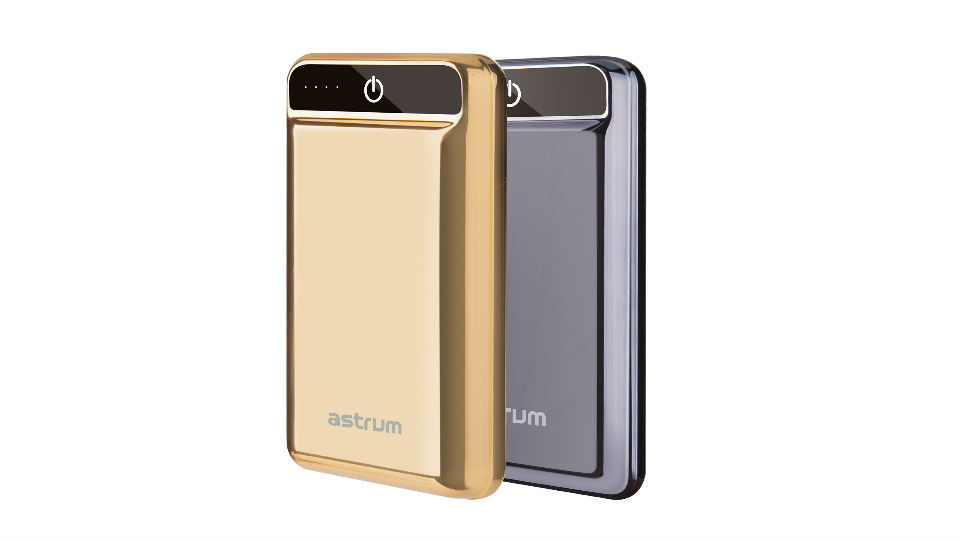
Astrum has brought a new power bank to India.  It is a 10000mAh power bank.  And you can buy it for 3499 rupees.  The price of this new power bank is PB240 and it comes as Quick Charge 3.0 power bank.

 Advertisements


 The company says this powerbank can charge up to 80% faster than other banks.  It offers cutting edge technology and this power bank has a 10000mAh battery and a dual USB output.

Advertisements


 And with this PB240 Powerbank is connected to LED status display and it charges 4 Indigator Light Power Bank.  It also has a Type C USB port, along with a micro USB port.  And it's connected to the Quick Charge USB port.  Its Quick Charge 3.0 helps keep the temperature cold.

 This power bank comes in Gold and Silver color.  And it takes 6 hours to charge and it can charge the phone 2-3 times simultaneously if it is full charge.  It can be purchased on Amazon with larger retail stores.

OPPO RENO Z and RENO 2 F prices dropped | Bangla Tech Jagat


Oppo launched their Reno2, Reno2 F and Reno2 Z smartphones in India in August 2019.  And this smartphone company is now offering these two phones at a discount of Rs 2000.  The Reno 2 phone is now being sold at its original price.

 Advertisements


 The Reno2 Z was launched in India at Tk 29,990 and the Reno 2 F phone was launched at Tk 25,990.  The price of 2Z and 2F phones is now Tk 27,990 and Tk 23,990 respectively.  And the price of this phone has been updated and is being sold on Amazon India.  The Oppo Reno 2Z phone can be purchased in Luminous Black, White and Polar Light colors, while the Reno 2F phone can be purchased in Leak Green and Sky White color.

You have the MediaTek P90 chipset on Reno 2Z phones.  And this phone has a 6.53-inch Full HD + display.  And on this phone you will get Corning Gorilla Glass 5 protection.  And there is no dance on the tip of this phone.  A 16MP camera is provided on the front of this phone.

 This phone is paired with 8GB of RAM and 256GB of storage.  And this phone has a quad camera setup which has 48MP main camera as well as 8MP ultra wide lens, 2 megapixel mono lens and 2MP portrait lens.  And this device is compatible with Android 9 Pi based Color OS 6.  And this phone has 4000mAh battery which has VOCC 3.0 support.

 Advertisements


How to export data from a single table and import into single table using phpMyAdmin? | Bangla Tech Jagat


There may be times when you need to export data from a single table and import it into a single table using an existing database phpMyAdmin.  In this post, we will discuss how to export data from a single table and import into a single table using phpMyAdmin?

Here is a scenario when such an activity may be needed for better understanding. This is from my practical experience.

So, there is this WordPress website we had, and the theme has to be customized. Since we did not want to disrupt the live site, we took a backup and installed a copy on the development system to further customize the site. During the customization process, we ran into some issues. And to isolate the problem, we disabled some plugins to check if the plugins were interfering with the problem.

The problem was, we were using a WordPress plugin called "Post Views Counter" to display views on each post. During the troubleshooting process described above, we also disabled the "Post Views Counter" plugin (or maybe even deleted it from the plugins page in WordPress). Later when we re-installed / re-enabled the plugin, we found the stats have been reset. The post views were all zeros. And we wanted to retain the values.

After the required customization was done, we needed to bring the stats from the "Post Views Counter" to the live site to the development site, before we upload it to the live server. Note: There could have been another way to do this, but we didn't want to take a risk. More on this described at the end of this post.

So here is what we did: export data from a single table and import into a single table using phpMyAdmin.

How to export data from a single table using phpMyAdmin?

To backup only one particular table in phpMyAdmin, click on the particular table and click Export. It will only export the table and not the entire database.

Activities on the live server:
Logged in to phpMyAdmin
Backed up the entire database (just in case needed)
Clicked on the particular table from the left sidebar (ngk_post_views in this case)
Clicked Export
This exported only the table (ngk_post_views in this case) in .sql file


Now that we have the backup of the particular table (ngk_post_views in this case), we need to restore it to the development server.


How to import data from a single table using phpMyAdmin?

To import data from a single table using phpMyAdmin, the process is the same as importing database. BUT, the table you are importing should not exist. Otherwise, phpMyAdmin will throw an error.


Activities on the development server:
Logged in to phpMyAdmin
Backed up the entire database (very important)
Click on the Database
Then select the table we will import, and click drop (table).


The Select T Database Again, Just In Case It Is Not Selected
Click and Import and Select T Backup File of TABLEDownloaded from Live Server


If Every Thing Gets Better, T Import Solda Success (Unless There Are Other Issues, Whitch Bay DD Note Encounter)


We clicked on the table and checked the values and the counts were restored.
View the posts on the site's front end, and we can see the counters restored.
Now that the post view counts have been restored, we have migrated the site to the live server.


By the way, to upload your WordPress website to live server, you can use plugins like "Duplicator". Here is a previous post on -How to use "How to download a website from live server to development local server |   Bangla Tech Jagat


As mentioned above, this could have been achieved in another way.
We could have "dropped" the post views table from the development system of phpMyAdmin and then exported the database. When this is uploaded to the live server, the post views table on the live server database is expected to be as it is. Ensure backups are taken before attempting any of the examples in this post, and at your own risk.


EPSON launches 5 new ink tank printers in India | Bangla Tech Jagat


Japanese electronics company Epson this week expanded its portfolio in India and launched 5 new A4 Hi-Fi iTank printers. The company said in a statement that five new models of the iTankTank printer have been launched, with L4150, L4160, L6160, L6170, L6190. Except for the L4150, all the prints are capable of duplicating printing. These headphones are available at Flipkart with a discount


The L4150 printer costs Rs 15,499 and the L4160 printer costs Rs 17,299. The L6160 printer is priced at Rs 20,399, the L6170 printer priced at Tk 20 and the fifth model L6190 priced at Rs 25,099.


Epson India's Chip Sajeeep Kumar says, "We have given many more benefits to our L Series iTank Printer experience. And it will be easier to use this time. And that will make it easier for our clients to do many things. "


Dark mode for the update of the Android phones in pixels, including 10 feature | Bangla Tech Jagat


Google has finally released the final update to their Android 10, as previously stated. This update comes on all Pixel phones via OTA. After its previous Android, Google broke their ten-year tradition and no longer named it a dessert. And Android brings multiple changes to their UI. There are also some major changes.Android 10's update also brings the Dark theme. And with this it will have less impact on the eyes and with it will save the battery. And besides modifying the system, the UI is also in the Dark Mode Support app. And with it there are eight different colors like Blue (default), Black, Green, Purple, Cinnamon, Ocean. Space and Orchid.


Dark theme of Android 10


The developers have given a new option that Force Dark features and it builds their new Dark theme, but with it comes the Dark version of the app.

Customers can enable this mode in multiple ways. However here we are suggesting a way to activate the Dark theme. You should also go to Settings> Display and battery saver here.


New gestures New navigation


Google has given a new gesture to the back button of Android 10. The gestures given in this UI in Elhan say that 'gestures will be faster. And it will be much more natural and ergonomic with phone navigation. "

And the tech giant has also stated that it is a two-button gesture navigation. And the number 1 button has gesture navigation that can be backed into main navigation. And if customers want to enable it, they have to follow this procedure - Settings> System> Gestures.

Privacy Control


Google has given their customers privacy control over Android 10, and with it control over app capability. You can go to Settings> Privacy> Activity Controls. And Android 10 can also have location, history and ad settings.

Apart from the feature, there have been several updates on security.

Bubbles is also a add-on to Android 10, which offers notifications and shortcut shares and more.

All these phones will come to MIUI 11 Is your phone on this list? | Bangla Tech Jagat


MIUI11 came with Redmi Note 8 Pro, Redmi Note 8, and Air Purifier 2C in India yesterday. Xiaomi announced the new MIUI11 update last month and it will replace OS MIUI 10 this time. And the company has given a list of smartphones saying that some phones will now get updates on this MIUI 11.Last month, the company launched MIUI 11 in China. And the company has said in Delhi's event that from October 22 to 31, Poco F1, Redmi K20, Redmi Y3, Redmi 7, Redmi Note 7, Redmi Note 7S and Redmi Note 7 Pro will start getting new updates. And the second phase starts from November 4 to November 12 and at this time these phones will get this update - Redmi K20 Pro, Redmi 6, Redmi 6 Pro, Redmi 6A, Redmi Note 5, Redmi Note 5 Pro, Redmi 5, Redmi 5A, Redmi Note 4, Redmi Y1, Redmi Y1 Lite, Redmi Y2, Redmi 4, Mi Mix 2, and Mi Max 2.


The third phase will have MIUI 11 updates for Redmi Note 6 Pro, Redmi 7A, Redmi 8, Redmi 8A, and Redmi Note 8 from November 13-29. And the newly launched Redmi Note 8 Pro phone is on this list and this device will get this update from December 18-26.


MIUI 11 has Allways On, Dynamic Clock, Wallpaper Crawl, Dynamic Video Wallpaper, Plating Calculator, Quick Response. In the event, the Mint Key Board has spoken about which will support 25 more Indian languages including English


New Philips monitors E9 display line-up: Radiant colour meets stylish design this series of three monitors initial price of Rs 9,999 | Bangla Tech Jagat


Philips TPV technology launches three new monitors. This monitor has been launched in the E9 series. It has been launched in 22-inch 226E9QHAB model, 24-inch 246E9QJAB and 27-inch 276E9QJAB model. And this device has Flickr free technology support. And in addition you get the label mode and with it there is AMD frisking and more.

Philips 22-inch monitor

On the e-monitor you get an IPS 16: 9 panel with its pixel resolution FHD 1920x1080 and in addition to the backlight you get a W-LED system. And let me tell you that it is a built-in 3W stereo speaker and also has VGA, HDMI, PC Audio-In and headphones out for connectivity.


Philips' 24-inch monitor


On this device you get 24 inches and its aspect ratio is 16: 9 and you have a FHD 1920x1080 pixel resolution. And wide color technology is added for AI Ultra connectivity. And you have a display port, VGA, HDMI, PC audio-in and headphone out port for connectivity.


Philips 27-inch monitor


It is the largest monitor in this range and you get a display port and 1.2 pixel density apart from the display port.All three models have Flickr free technology and in addition you get Low Blue mode. Which specializes in three monitors.

The price of these monitors


Let me tell you that you can buy a 22-inch monitor for Rs 9,999. And its 24-inch model can be purchased for Rs 11,495. And with this 27-inch model you can buy it for around 16,495 rupees. And you can buy it at all retail stores.

Motorola MOTO G5 PLUS REVIEW | Bangla Tech Jagat


Diagnosis


 This time the Moto G3 Plus is a expensive phone, but it has an improved camera.  It has enhanced contrast and dynamic ranges, which is not the case for other types of phones.  It has impressive battery life and reliable performance.  If Motorola added a waterproof device to it, it would certainly be one of the best phones.


Motorola MOTO G5 PLUS DETAILED REVIEW


 Motorola's event closes with Nokia's return to the Mobile World Congress.  As a result, many have turned their eyes to Nokia's phones, so there was less curiosity than any of the 20 best phones.  This Moto G5 Plus is the fifth iteration of the company's best Moto G series, and it's much faster.


 Its 12MP rear-facing camera sets it apart.  It has the same aperture as the Samsung Galaxy S3, it has dual-pixel technology similar to the S5, and it also has f / 3.0 aperture boot.  This is a phone within budget.

 Camera


 We received this phone a week ago, which is enough time to test its camera.  The rest of the details have been said before but Motorola did not say what sensor was used in it.  The widely used USSD code no longer works on this device, so we could not determine its sensor.  You will find a quick explanation of the dual pixel technology in it.

 A brief look of the camera is that it has a powerful sensor similar to the Samsung Galaxy S4.  Within the budget of the G1 Plus, which is quite acceptable.  The importance of the camera is the focus of its impressive dynamic range, which reproduces white balance and colorful images in all directions.


The Moto G5 Plus produces high dynamic range and warm colours on regular daylight condition


The Moto G5 Plus comes with a good color contrast, and its tonal quality is good, and its dual camera is similar to the Honor 6X and Coolpad Cool.  Its ISO level is usually between 1 and 5.
A brief look at the camera is that it gives a very clear picture, and it doesn't have such a powerful sensor like the Samsung S3.  However, the G4 Plus budget is acceptable for phones.

 The phone has good RESO level but it is not clean enough at 5% zoom  The Moto G5 Plus is good enough in this budget phone for using social media.

 Its camera is weak in terms of processing speed and focusing.  This weakness in comparison to the phone compared with the Samsung S5 is surprising.  Its camera image is bad when taking small pictures.

Build and design


 This smartphone is of metallic design.  The back cover of the MotoG3 and G6 Plus has non-movable aluminum plates.  It has given it a Premier look, an upgrade over the previous Moto G series device.  Although it is similar to the Redmi Note 4, Honor 6x and Coolpad Cool.


This smartphone is of metallic design.  The back cover of the MotoG3 and G6 Plus has non-movable aluminum plates.  It has given it a Premier look, an upgrade over the previous Moto G series device.  Although it is similar to the Redmi Note 4, Honor 6x and Coolpad Cool.

 To make the device compact, Moto has made its screen smaller.  It is not very convenient for single hand to be a little wide.  It has a fingerprint sensor on the front like last time.


Performance


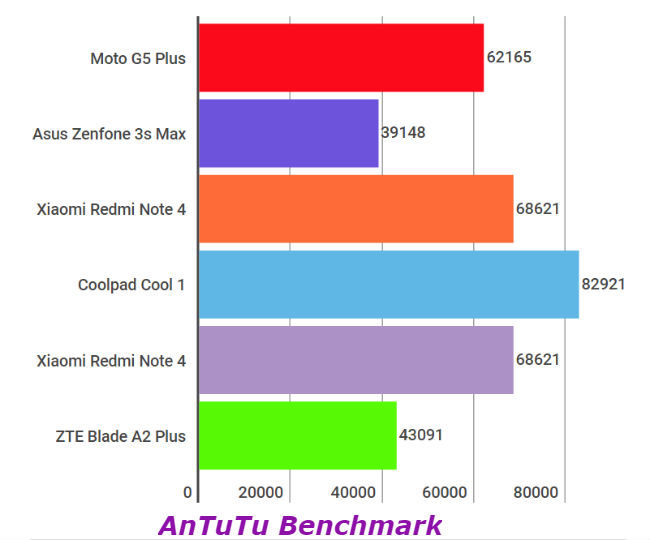
 Snapdragon 125 balances between power and efficiency.  Qualcomm has used eight Cortex-A53 cores at 14nm cheaper, up to 2GHz.

 Eight cores are active, though its share is below 1GHz.  You get four core clocks of 2GHz for this when playing games or other heavy applications.  Fast apps will take time to load.  For an app like Asphalt 8, your phone will temporarily stop.


The Moto G5 Plus phone offers a great shutter free performance.  It's a snapdragon 625 SoC, with 4GB of RAM and an intelligent engineering model from Motorola.  The question remains if this could have been a better one with a Snapdragon 650 or 652.

 Battery


 With so many features, this phone is a little difficult to operate with a 3000mAh battery.  Although the Moto G4 Plus can run the phone for at least one day with this battery.


Display and UI


 The Moto G5 Plus has a 5.2-inch 1080p display, with a density of 424ppi pixels.  Now that almost all phones have such a display it is not bad to see the phone.  Price wise the display is okay but you should expect nothing more.  Motorola has given it a better display than before.  The phone is powered by Android Nuga.  This Motorola phone can be swiped left to right with a fingerprint sensor.

 The conclusion

 Motorola has not yet told us its price.  Usually the Moto G series is priced at around Tk.  At a price of Tk 20,8, the Moto G5 Plus is offering the best camera at the moment, even though it's not a very powerful device, it is doing its job well.

 The Moto G5 Plus is definitely good for those who are thinking of a good camera, and it is quite good within the budget prize.


Google Search

The Web Only Soulsbox